Applicable models
All BEVs & PHEVs
(Please note: No DC charging available for PHEVs)
You are currently viewing content for the location:
Great Britain / English
This article provides a clear overview of how public charging (AC or DC charging) works for Porsche cars. It explains the key processes involved and guides you through each step to ensure a smooth and efficient charging experience.
All BEVs & PHEVs
(Please note: No DC charging available for PHEVs)
Charging your Porsche is designed to be simple and seamless - just like refuelling, but smarter and more connected. Instead of fuel pumps and nozzles, the process relies on digital communication and well-orchestrated interfaces.
These four components are needed to charge:
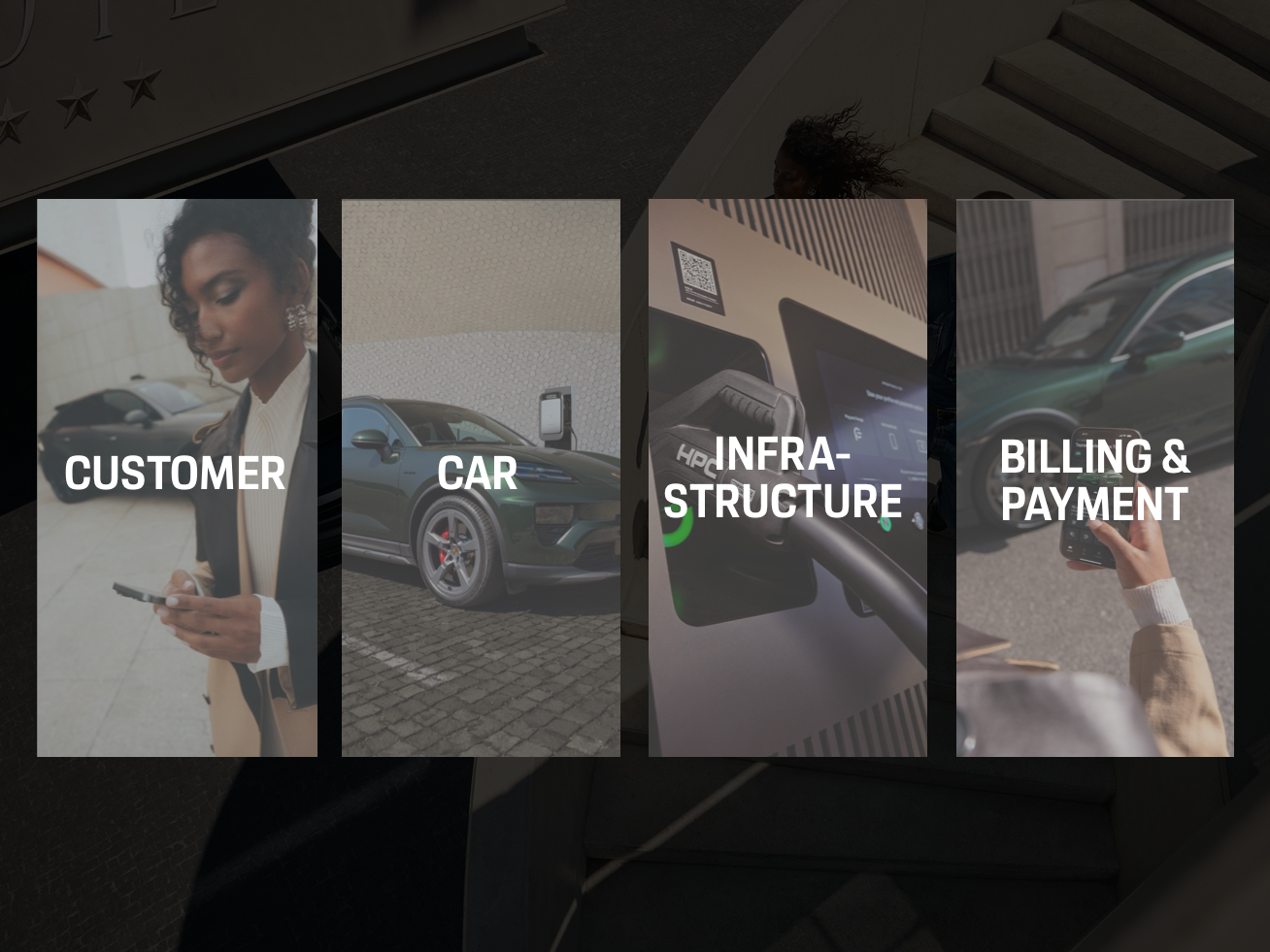
As a customer, you initiate the charging process, interact with the infrastructure (charging station) and provide feedback to ensure a smooth experience.
The car manages energy intake, communicates with the charging station and safeguards the battery throughout the session.
The charging station delivers energy, handles power conversion and provides a user interface while maintaining safety and load management.
Everything you need is already in the My Porsche app: Your Porsche Charging Service is fully integrated, and payments are handled automatically each month using the credit card you’ve stored in the app. All charging costs are settled directly with the infrastructure providers – so there’s no extra effort for you.
You are the starting point of every charging session. By parking your Porsche, connecting the cable and authorising the process, you set the chain in motion. Throughout the session, you stay informed and in control, with real-time updates and the ability to end charging whenever you choose.
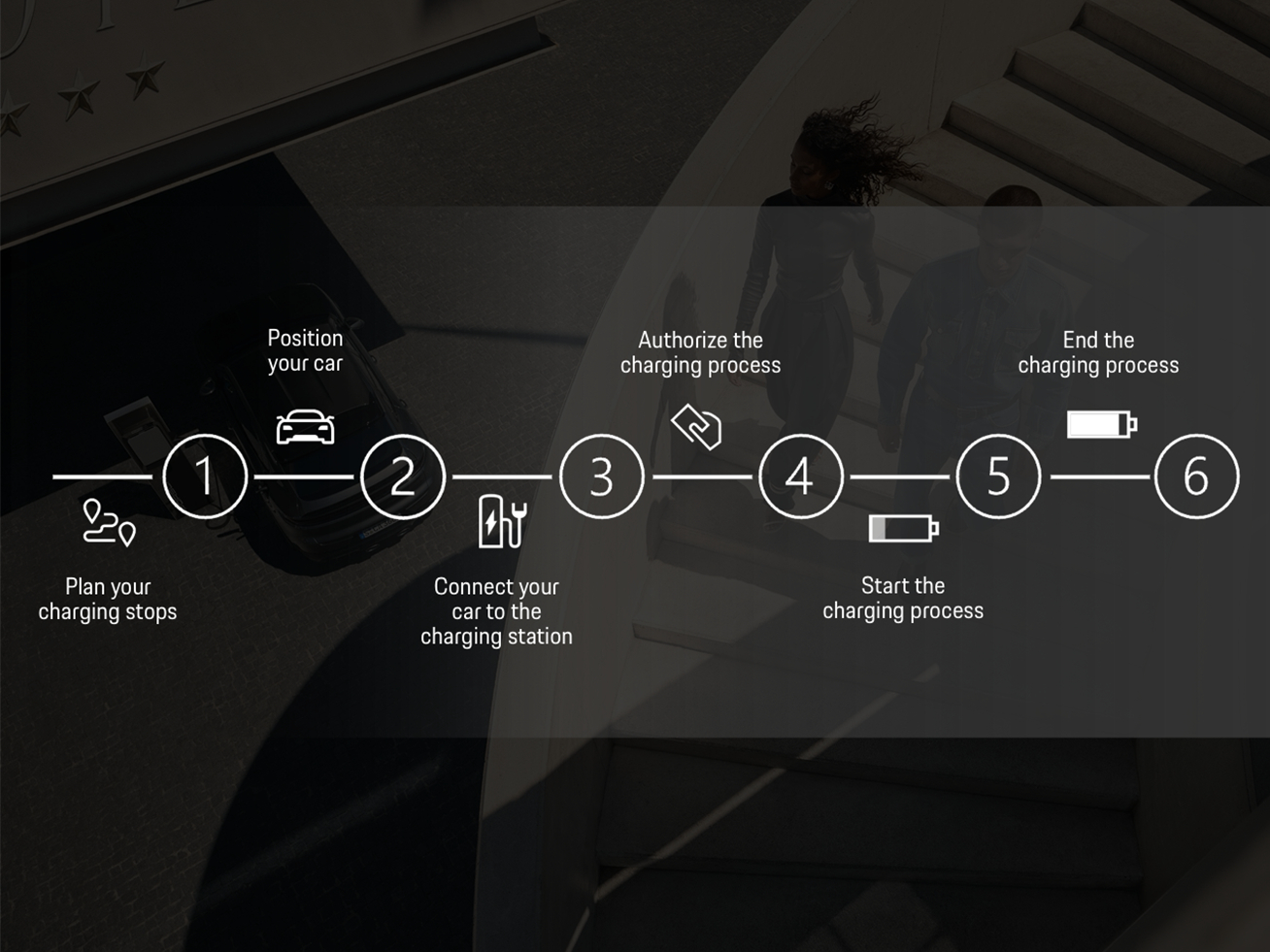
Planning your charging stops and preconditioning your car makes public charging more efficient and faster. The Porsche Charging Planner ensures worry-free and quick travel through intelligent, forward-looking planning of charging stops. Thanks to its integration with the My Porsche app and your Porsche navigation system, you can conveniently plan your route.
These illustrations show the locations of the charging ports for the Macan Electric, Cayenne Electric, and Taycan. Tip: Please refer to your car’s Owner’s Manual to check if there are more specific details for your model.
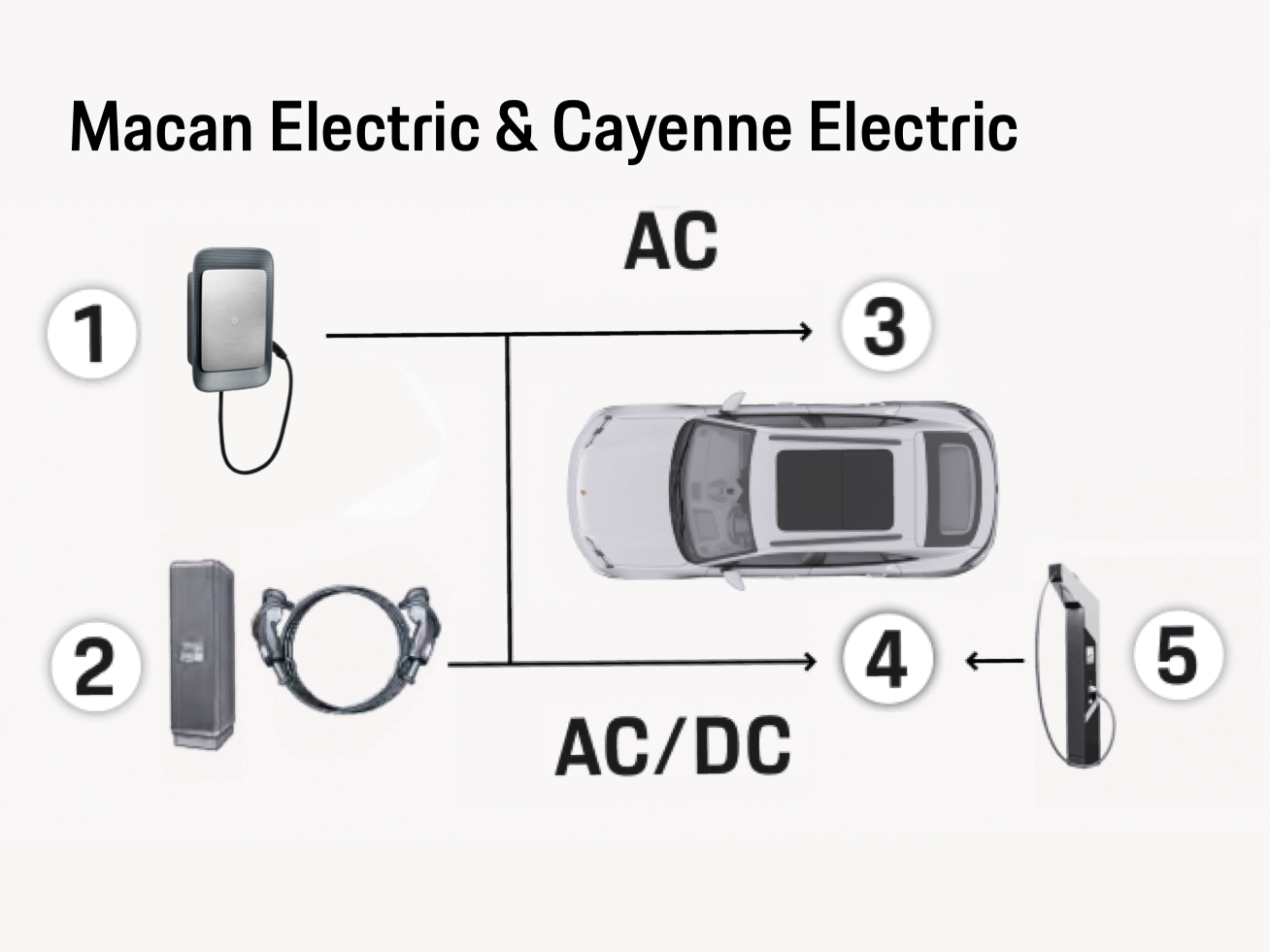
1) Charging equipment with AC, 2) Charging station with AC, 3) Charge port driver’s side (right-hand drive) or passenger side (left-hand drive), 4)Charge port driver's side (left-hand drive) or passenger side (right-hand drive), 5)Charging station with DC
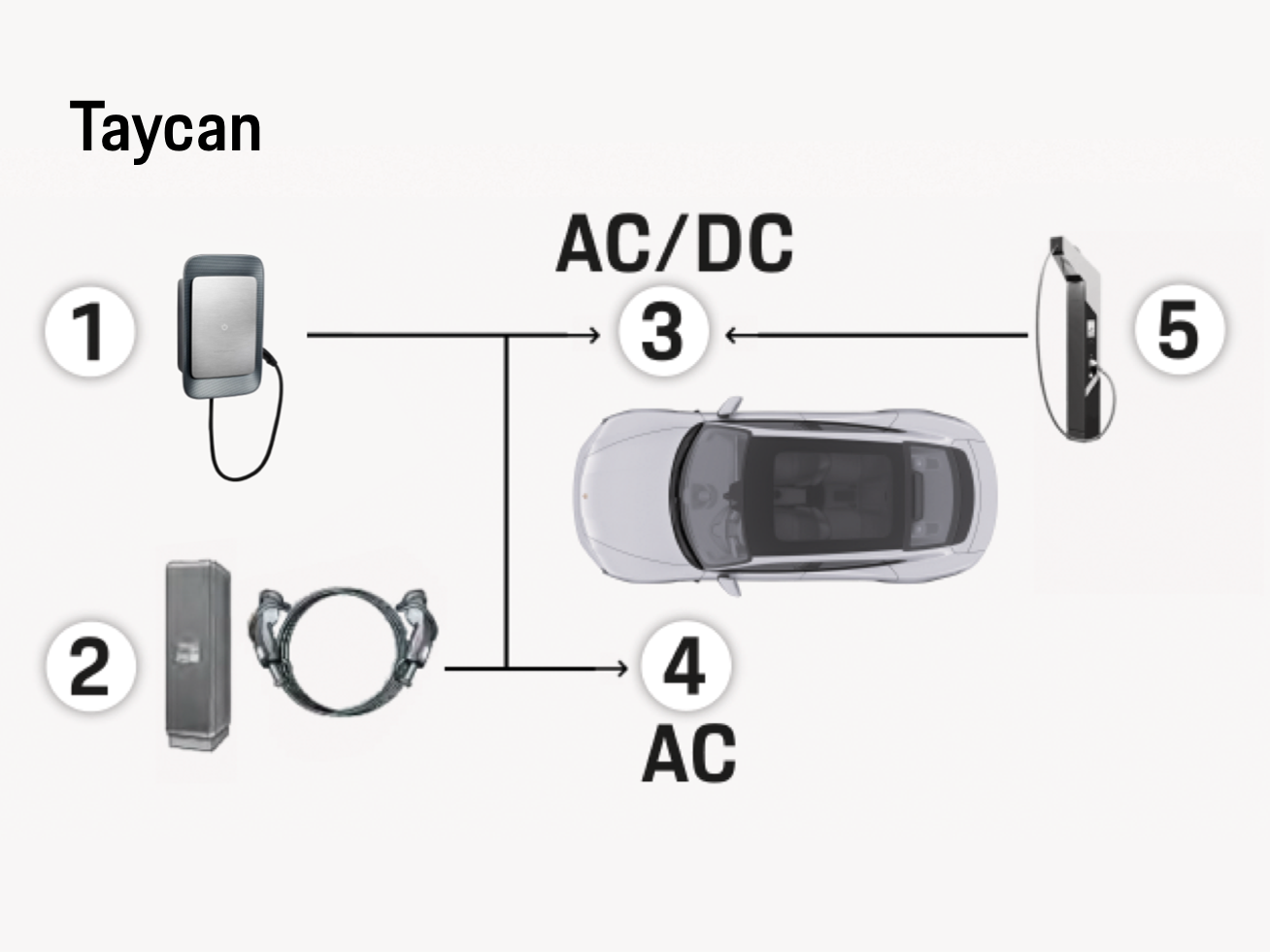
1) Charging equipment with AC, 2) Charging station with AC, 3) Charge port driver’s side (right-hand drive) or passenger side (left-hand drive), 4) Charge port driver's side (left-hand drive) or passenger side (right-hand drive), 5)Charging station with DC
You have several convenient ways to authenticate at public charging stations:
Once enabled (learn how to enable Plug & Charge in your Macan Electric, Cayenne Electric or Taycan), this is the simplest solution. Just plug in and charging starts automatically. No additional authentication required.
Plug & Charge is currently available at IONITY, Aral pulse, Audi Charging Hubs, Porsche Centre turbo chargers and Porsche Charging Lounge locations. Your My Porsche app will be able to tell you whether a particular charging station supports Plug & Charge. Open the My Porsche app on your phone > Tap Map (navigation arrow in the bottom navigation bar) and enter your location > Tap Show charging stations (at the top of the map) > filter the map view to only see chargers that offer Plug & Charge.
With Plug & Charge, the communication between the car and the charging station may take a moment. Switching to another authentication method too early can cause the charging session to be interrupted.
Use your charging card (e.g., Porsche Charging Card or the optional Charging Service crest key fob for quick activation.)
An easy alternative to the Porsche Charging Card.
*Note: After connecting your car to the charging station, you have 60 seconds to authenticate. If authentication isn’t completed within this time, an error message will appear and the charging process must be restarted.
You can find more information in this article How to authenticate a Porsche at a public charging station | Ask Porsche
Stop the charging session when you’re ready or once the battery reaches the desired charging level:
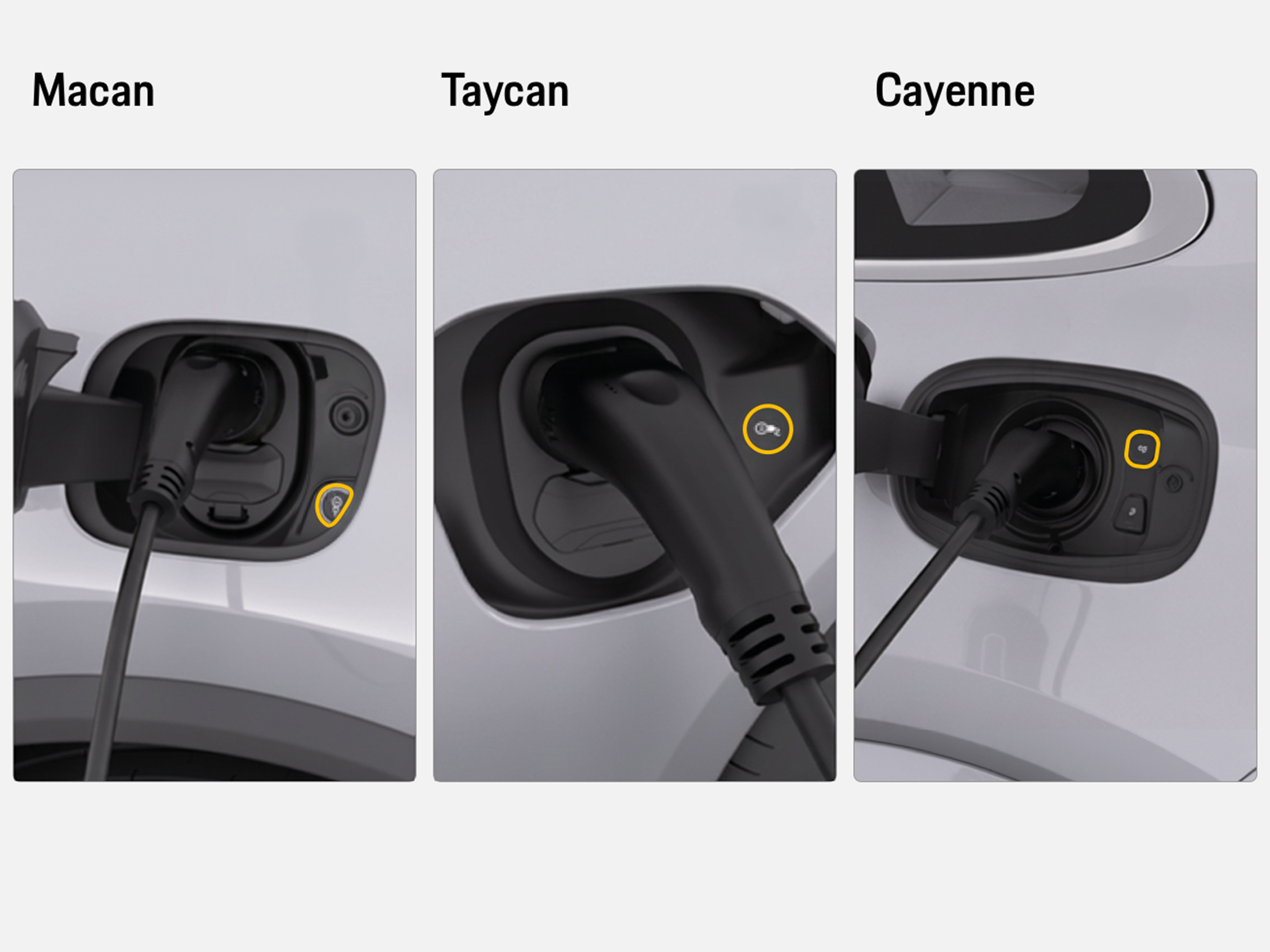
Remove the plug
The video below will guide you through the process as well:
Your Porsche is the intelligent core of the charging process. When charging with AC, it uses its onboard charger to convert AC power into DC.
The car precisely regulates how much power is drawn from the station and seamlessly exchanges data, such as authentication and charging parameters. Throughout the session, it monitors temperature, voltage and current to maintain safety and performance, delivering optimal charging that protects your battery. Once your target charge level or safety limits are reached, the car automatically concludes the process.
The charging station is your gateway to energy. It supplies power from the grid to your car and, for fast DC charging, converts AC into DC directly at the station. It communicates seamlessly with your Porsche to exchange essential data such as authentication and charging parameters. Advanced safety systems ensure proper grounding, overload protection and fault detection at all times. The station also offers convenient authentication options – whether via Plug & Charge, RFID or My Porsche app – and keeps you informed about charging status. Behind the scenes, it intelligently balances power demand to protect the grid and optimize efficiency for every session.
Before you start charging, payment is the key that unlocks the process. Simply choose the payment method that works best for you: either your Porsche Charging Service or ad hoc payment by credit card.
The responsible mobility service provider (e.g. your Porsche Charging Service) ensures everything runs securely and transparently. It validates your session, processes transactions and provides clear cost reporting so you always know what you’re paying for and can focus on the drive, not the details.
If you have questions about your Porsche Charging Service invoice, please read the relevant articles available or contact our Customer Service.
Relevant articles:
How do I view and manage my Porsche Charging Service contract?
Where can I find the charging invoices for my Porsche?
Find the contact details for our customer service at the bottom of this page.
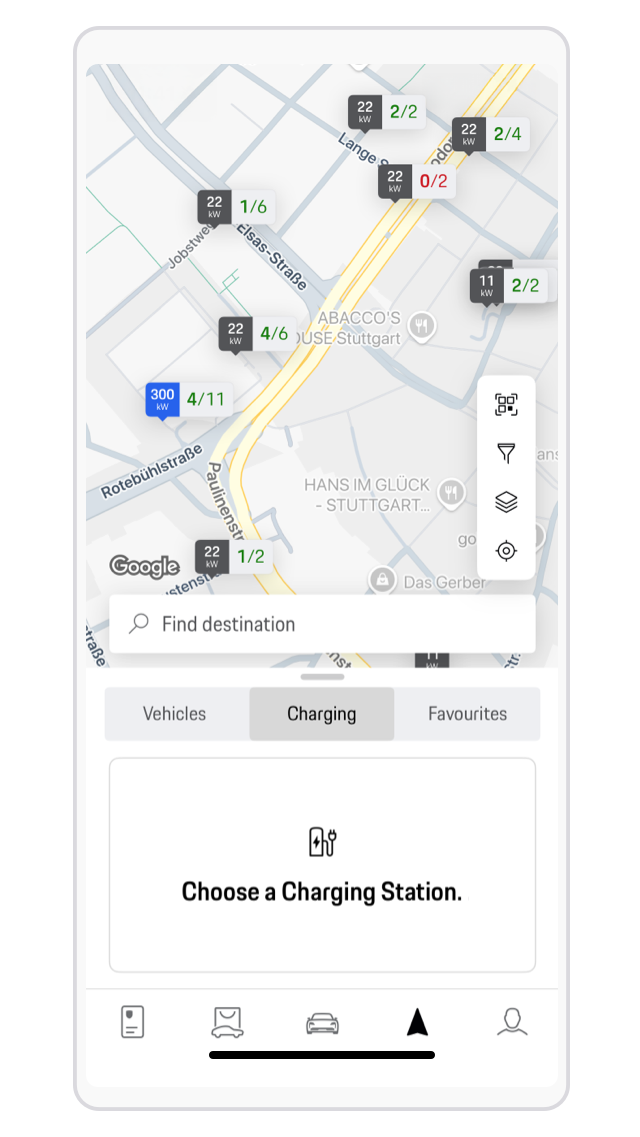
The dynamic status of the charging points is displayed in the My Porsche app and in the Porsche Communication Management (PCM) infotainment system of the car. The status shows how many charging points are available for use and how many charging points exist at the charging station.
This can be clearly illustrated using a specific example:
If the status ‘4/4’ is displayed, this means that 4 out of 4 charging points are available.
If a charging point is reported as ‘out of service’, the number of charging points displayed is reduced and the app shows ‘3/3’.
In the details you will then find the charging point with the display ‘out of service’.
If all charging stations report ‘out of service’, this location is not displayed in the My Porsche app. Alternatives are immediately visible on the map.
Here’s how the availability of charging stations is displayed in the app:
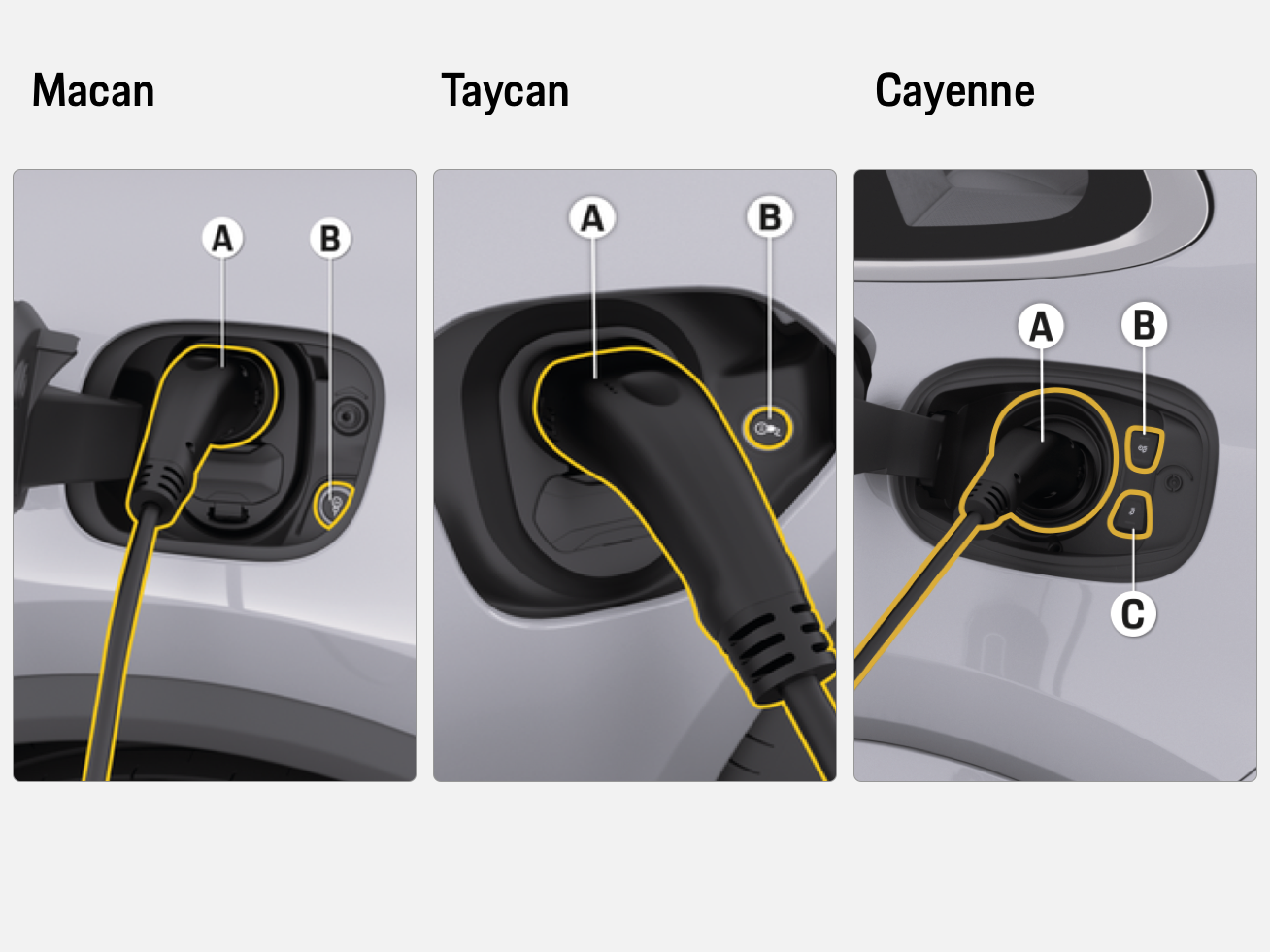
If you come across a charging station in the EU with outdated software you could potentially experience difficulties. In this case, before switching to a different charging station you can activate Compatibility Mode in the PCM and try to charge again. This allows you to charge at incompatible charging stations, which means the encryption between the car and the charging station will be suspended during the establishment of communication with the charging station. Please note: during this time, the Plug & Charge function isn’t available. When you restart your car, Compatibility Mode turns off automatically.
Before activating Compatibility Mode, make sure the charging cable isn’t plugged in and follow these steps:
Alternatively, you can turn on Compatibility Mode by pressing and holding the release button (B) at the car charge port for three seconds.
Authentication at a charging station fails via My Porsche app, Charging Card and/or Plug & Charge.
Relevant articles:
How can I authenticate at a public charging station?
How to enable Plug & Charge in your Porsche Taycan
How to enable Plug & Charge in your Macan Electric
Managing your Porsche Charging Service contract | Ask Porsche
How Porsche Customer Service can help:
Customer Service will help you to activate the charging station remotely after successful authentication or to find an alternative charging station nearby.
If the charging station is out of order or there is any other obvious problem, please contact the operator directly. The contact details are provided on the charging station or in the My Porsche app (Apple App Store/Google Play Store) for the respective charging station under Support.
Relevant articles:
What is the Porsche Charging Lounge and how can I access it?
What is Porsche Destination Charging?
How Porsche Customer Service can help:
Customer Service can access charging stations operated by Porsche (for example: Porsche Charging Lounges) remotely and perform a reboot after successful authentication.
The charging process could not be completed / is still displayed as active in the My Porsche app.
Relevant articles:
The charging process for my Porsche isn’t starting. What do I do?
How do you end the Porsche charging process?
How Porsche Customer Service can help:
Customer Service can help you to end the charging process remotely. If further diagnostics are necessary, Customer Service will be happy to help you work with our experts to find a solution.
Find the contact details for our customer service at the bottom of this page.
No, once the charging plug is inserted into the car charge port, it’s automatically detected by the car and locked. The charging cable can’t be disconnected and your Porsche is secure from being driven away.
This might be due to the charging station being offline and not transmitting any current data. In this case, you can end the charging session in your app manually or just ignore it. Only the actual charging time recorded at the charging station is considered for invoicing.
Want to learn more about E-Mobility? Click here to get an overview of all available articles.
You can access static and dynamic charge point data from Porsche Sales and Marketplace by filling in this form. It will be processed within five working days. Request public charging data here.
Consumption and Emissions
Macan Turbo (WLTP): Electricity consumption combined: 20.7 - 18.9 kWh/100 km; CO₂ emissions combined: 0 g/km; CO₂ class: A; Status: 04/2025
Taycan Turbo Cross Turismo: Electrical consumption combined (model range): 3.3 – 2.9 mi/kWh, Range combined (model range): 330 – 373 miles, CO2 emissions combined* (model range): 0 g/km
Macan 4S Electric: Electrical consumption combined (model range): 3.5 – 3.0 mi/kWh, Range combined (model range): 326 – 379 miles, CO2 emissions combined* (model range): 0 g/km