You are currently viewing content for the location:

International / English

Close country selector banner

How to resolve issues with Remote Services in the My Porsche app

Porsche Connect Remote Services allow you to operate certain functions of your Porsche remotely or retrieve data from your car via the My Porsche app. For example, you can check your car’s current status, including battery level or fuel range, tyre pressures and trip data from previous journeys. You can also control functions such as pre-conditioning the cabin temperature, locking or unlocking the doors and setting location or speed alerts.

Prerequisites for using Remote Services

Before you can use Remote Services, make sure you have completed the steps outlined in the article How to connect the My Porsche app to your car. Please note that your app functionality is dependent on your car’s model, model year, equipment and market. Check the Porsche Connect Store for more details and prices specific to your car.
Troubleshooting

Below, you’ll find an overview of possible causes of issues with the Remote Services and how you can resolve them.

Granting remote access authorisation

If you haven’t yet authorised remote access in your car, you’ll be notified on the home screen of your My Porsche app. Please refer to How do I grant remote access authorisation in my Porsche? for more information.

If you are a secondary user, please make sure that you have been set up in My Porsche by the main user of the car. For further help, please read What is a secondary user and how can I add it for my Porsche?.

Deactivating privacy mode

Occasionally, remote functions may not work due to privacy mode activation. In this case you’ll be notified on the home screen of your My Porsche app. For details on turning privacy mode off, refer to What is the privacy mode and what is it used for?.

Extending or activating services

If your Porsche Connect Services haven’t been activated or have expired, you’ll be notified about the missing services in your checklist on the home screen of the My Porsche app. Follow the link to activate the services.

Alternatively, you can activate or extend your Connect Services directly in the Connect Store.

Updating/refreshing/reinstalling My Porsche app

Make sure that you have installed the latest version of the My Porsche app. For instructions, see:How to manually update apps from the App Store – Apple SupportHow to update apps on Android - Google Play HelpRefresh the My Porsche app by closing it completely and opening it again. For instructions, see: Close an app on your iPhone or iPod touch – Apple Support Find, open & close apps on Android - Android HelpUninstall and reinstall the My Porsche app on your mobile device. For instructions, see:If an app on your iPhone or iPad stops responding, closes unexpectedly or won’t open – Apple Support (see ‘Delete the app, then re-download it’)Fix an installed Android app that isn't working - Android Help

Checking internet access on your smartphone and car

Make sure you have a stable internet connection on your phone and in your car.

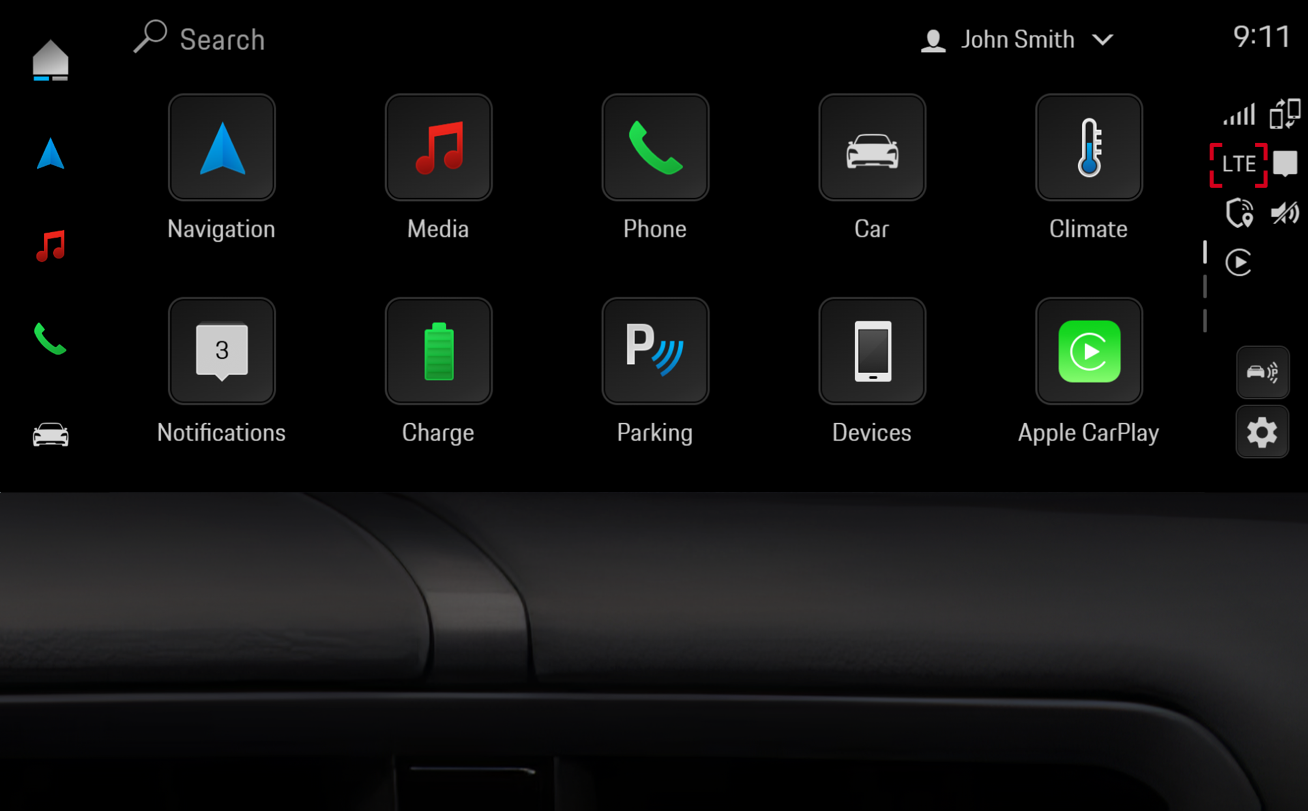
You can check whether your Porsche has an internet connection on the home screen of the Porsche Communication Management (PCM) infotainment system. If you see the 'LTE' or '5G' icon on the right- or left-hand side of the screen (depending on your model), your Porsche is connected to the internet.

Example screen

Reset of the security code

If you don’t have a connection to Porsche Remote Services, it could be because of a security code reset. The security code is a personal four-digit code used to authorise access to security-relevant functions and some Remote Services. After the security code has been reset, the link between your Porsche ID and your car is removed and remote access authorisation is revoked. All car-related services (particularly Remote Services) can no longer be used. This also applies to secondary users: adding secondary users isn’t possible at this stage. For more information, see How to use the Porsche Security Code?

If none of the measures above resolve your issue with the Remote Services, please contact our Customer Service (details below).

Need further help?​

If you require further guidance, we can assist you in finding the right solution.

Some of the described products, features, and processes may vary depending on the country, model, and model year.