You are currently viewing content for the location:

United States / English

Please select your region/language

You are currently in United States

United States
Close country selector banner

What is the Porsche Charging Service and how do I manage my subscription?

The Porsche Charging Service gives you access to over 102,000 charging stations nationwide, all with seamless billing through the My Porsche app. Using the My Porsche app or Plug & Charge, initiating the charging process is more convenient than ever.  

This article applies to all electric makes and models  

Table of Content

  1. Applicable models
  2. What Porsche Charging Service plans are available?
  3. How do I activate the Porsche Charging Service? 
  4. How do I choose a Porsche Charging Service Plan after the Inclusive Period ends?   
  5. How do I cancel my Porsche Charging Service contract? 
  6. How do I cancel my Porsche Charging Service plan? 
  7. Where can I find the Terms of Use for my Porsche Charging Service contract? 

Applicable models

All BEVs and PHEVs.

What Porsche Charging Service plans are available?

Porsche Charging Service Inclusive Period for the Taycan (MY2025) and the Macan electric (MY2024 & MY2025) 

The Porsche Charging Service provides a 1-year Inclusive Period, beginning on the day you purchase your electric Porsche. This includes 30 minutes of inclusive charging per session plus a 10-minute idle fee grace period at Electrify America stations nationwide. At least 60 minutes between two consecutive sessions are required. You also have the option to access the ChargePoint roaming platform which can be activated on the Subscriptions page in your My Porsche app.  

If you own a Taycan MY2020 - MY2024, the Porsche Charging Service offers a 3-year Inclusive Period along with the same inclusive charging, idle fee grace period and ChargePoint access referenced above. 

Porsche Charging Service 

Once your Inclusive Period ends, you will be automatically enrolled in the Porsche Charging Service plan at no cost. This plan provides access to Electrify America charging stations at standard pricing.  

Porsche Charging Service Premium plan 

You can also upgrade to the Porsche Charging Service Premium plan. This plan has a 1-year contract period for $99. The Premium plan includes a 25% discount to Electrify America and access to the ChargePoint roaming platform. 
button activate subscription

How do I activate the Porsche Charging Service? 

If you have never used the Porsche Charging Service before, follow these steps to begin: 

Open the My Porsche app (Apple App Store/Google Play Store) (login required). Tap Account (person icon in the bottom navigation bar) or scroll down on the home screen and tap the Charging widget.Tap Charging Service.Tap Activate Charging Service. You’ll see the details of the available plans for your vehicle. Tap on Proceed with activation. Activate your plan by adding your billing address and preferred payment method. Agree to the General Terms and Conditions. Confirm your order. 

Your Porsche Charging Service plan is now activated. Use your My Porsche app to authenticate yourself at one of our partner charging stations. For even more convenience, you can activate Plug & Charge.  

How do I choose a Porsche Charging Service Plan after the Inclusive Period ends?   

You’ll have the opportunity to choose between several plans with different prices, such as the Porsche Charging and the Porsche Charging Service Premium plan.  

To switch plans: 

Open the My Porsche app (Apple App Store/Google Play Store) (login required). Tap Account (person icon in the bottom navigation bar) or scroll down on the home screen and tap the Charging widget. Tap on Manage Subscription. You will be forwarded to the mobile-optimized web view. Tap Subscription.  Tap on Porsche Charging Service. Click on Manage. Select your desired plan and sign up for it. 

How do I cancel my Porsche Charging Service contract? 

Open the My Porsche app (Apple App Store/Google Play Store) (login required). Tap Account (person icon in the bottom navigation bar) or scroll down on the home screen and tap the Charging widget Tap on Manage Subscription. You will be forwarded to the mobile-optimized web view. Tap Subscription.  Tap on Porsche Charging Service. Scroll down and tap Terminate the Contract at the bottom of the page. You’ll be forwarded to a separate page where you can confirm your cancellation. 

How do I cancel my Porsche Charging Service plan? 

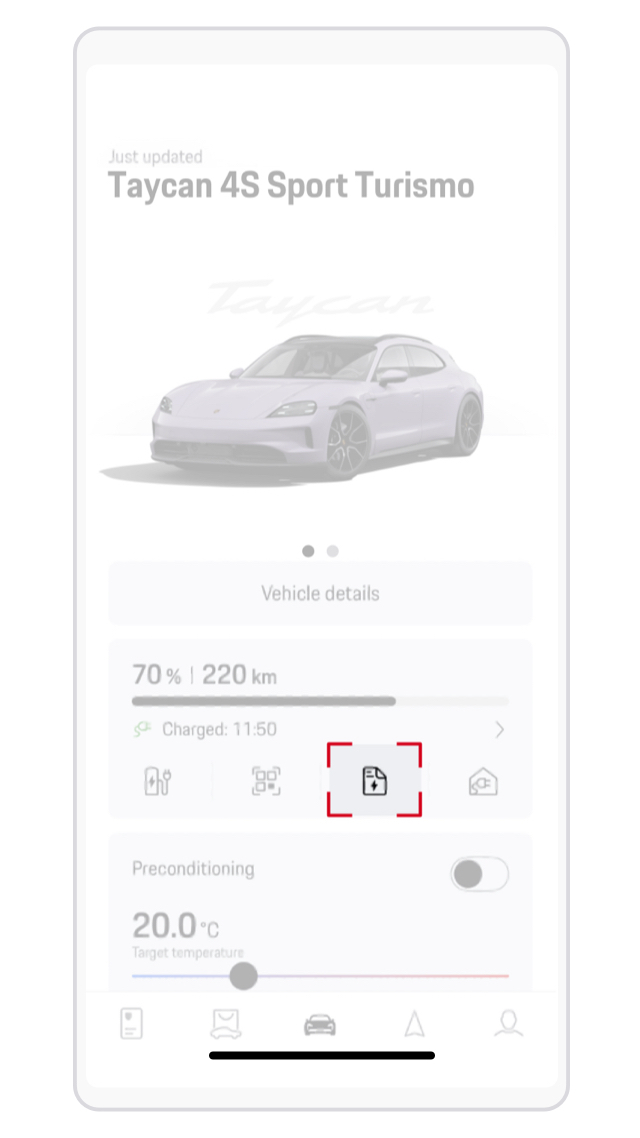
Open the My Porsche app (Apple App Store/Google Play Store) (login required). From the home screen, tap the document icon or Account > Charging Service. Tap Manage Subscription. You will be forwarded to the mobile-optimized web view. Tap Subscription. Tap your Porsche Charging Service plan.Scroll down and tap the button Terminate the contract at the bottom of the page. You’ll be taken to a separate page where you can confirm your cancellation. 

Where can I find the Terms of Use for my Porsche Charging Service contract? 

A link to the Terms of Use is provided during the contract activation process. Once you’ve signed up for the plan, you’ll receive a confirmation email containing the Terms of Use. You can always go back to this email and review.   

Would you like to help us improve Ask Porsche?
No