Applicable models
Macan Electric from model year 2024
Cayenne Electric from model year 2026
You are currently viewing content for the location:
Switzerland / English
Please select your region/language
With Plug & Charge you can conveniently charge your all-electric Macan or Cayenne without the need for external identification such as an app, RFID card or credit card at the charger. When you plug in the charging cable, your car automatically communicates with the Plug & Charge-enabled charging station. The charging process and subsequent billing process will then start automatically.
Macan Electric from model year 2024
Cayenne Electric from model year 2026
Before you activate Plug & Charge, ensure the following:
You’ll then be able to proceed to the activation of Plug & Charge in the Porsche Communication Management (PCM) in your car or in the My Porsche app:
After you’ve successfully activated Plug & Charge (see above) in the second step you need to install your Porsche Charging Service contract certificate.
You can also use Plug and Charge with a Mobility Service Provider (MSP) of your choice that offers Plug & Charge-enabled charging stations. The MSP will create a Plug & Charge contract certificate which will then be available in the My Porsche app for installation. You’ll be notified in the My Porsche app about the availability of the certificate. Before concluding the contract, it is important that you first activate Plug & Charge as described in step 1 above. Otherwise, your MSP is not able to make the certificate available to you.
Please note that although multiple contract certificates can exist for one car, only one contract certificate can be installed at a time.
Depending on your car’s reception, the installation of a contract certificate may take up to one minute.
An activated privacy mode may prevent the update of a certificate. To remove the privacy mode, please refer to What is the privacy mode?. You also need to ensure that your car has internet connection. If it’s parked in an underground garage, for example, it may be offline.
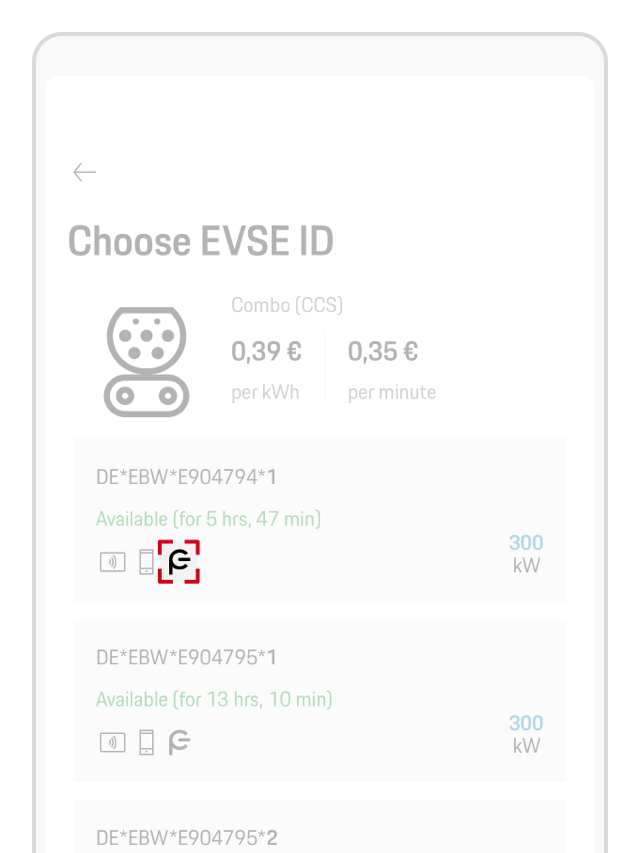
Not all charging stations are compatible with Plug & Charge. Your My Porsche app will be able to tell you whether a particular charging station supports Plug & Charge. Here’s how to find out:
Tap the relevant EVSE-ID. A Plug & Charge icon (see the image below) will then show whether Plug & Charge is supported or not.
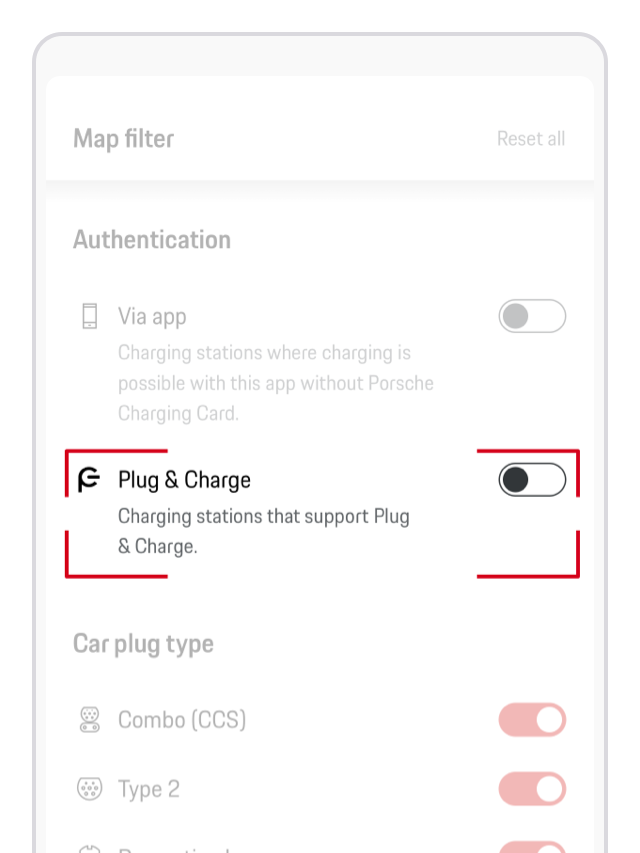
You can also set a filter on the map view to only see chargers that offer Plug & Charge. The list of those chargers is curated by the Porsche Charging Service.
If Plug & Charge is activated in the Porsche Communication Management (PCM), your Porsche Charging Service contract certificate is installed and Plug & Charge is supported by the charging station, and yet an error occurs while trying to start charging, the charging station automatically turns on the compatibility mode.
Compatibility mode allows you to charge at charging stations that are not fully compatible with Plug & Charge. It turns off automatically when you restart the vehicle or change gears.
You can also start the compatibility mode manually. Before doing so, make sure that charging cable isn’t plugged in.
Alternatively, you can turn on compatibility mode by pressing and holding the release button at the vehicle charge port for 3 seconds.
Please note: While compatibility mode is active, the Plug & Charge function is not available. For your next charging attempt, you’ll need to use an alternative authentication method.
Plug & Charge and AutoCharge work in a very similar way: once you plug in the charging cable, the car authenticates automatically and the charging session starts without any additional steps. However, the two systems rely on different underlying technologies, and not every charging operator supports both.
Please note:
Alternatively, if you're not using Plug & Charge to charge at a public charging station, there are different unlocking and authentication methods available.
Selected charging stations can be unlocked using Plug & Charge by simply inserting the charging plug into your car. In the event of any futher compatibility issues with a specific charging station, or if you do’t wish to use Plug & Charge in principle, the feature can be deactivated in your car's Porsche Communication Management (PCM) in order to start the charging process manually:
If you require further guidance, we can assist you in finding the right solution.